- Login to your Joomla admin
- Select Content → Site Modules
- Here you can find and enable the “Videos – Yendif Video Share” module
- You can edit this module and add the required fields
- Click “Save” at the top of the page.
Module properties
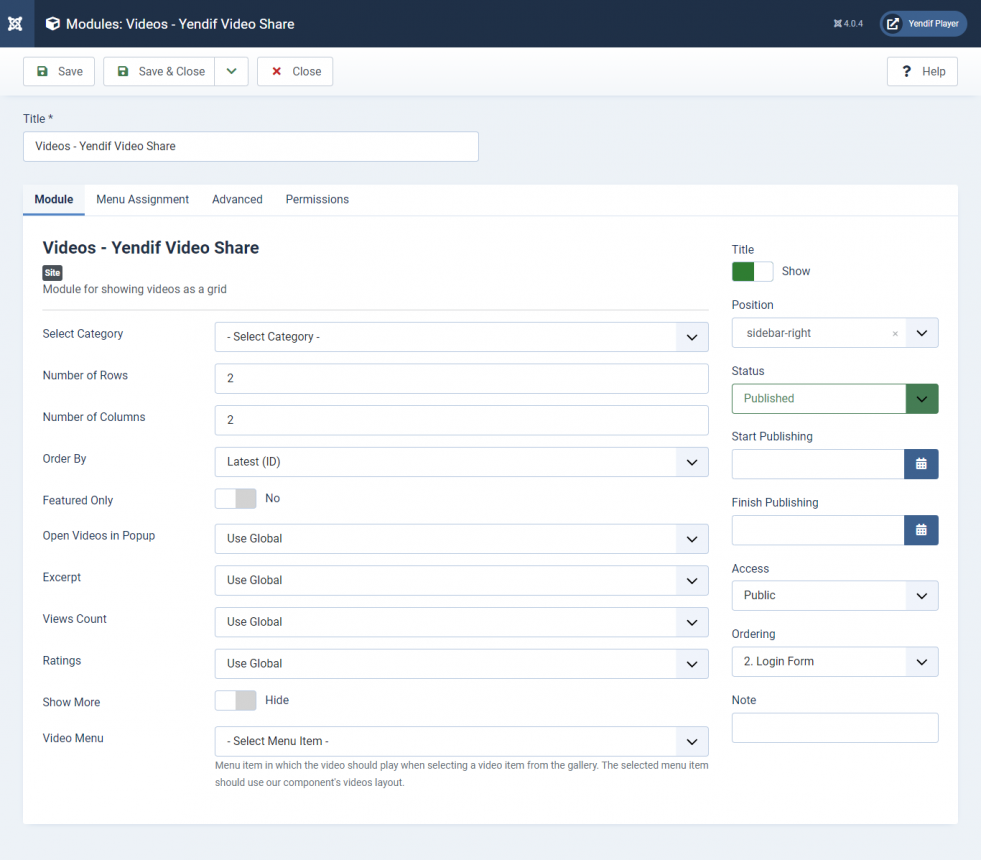
| Option | Description | Example |
|---|---|---|
| Select Category | Select category from the which the gallery should be created. | Albums |
| Number of Rows | No of rows in the gallery pages. | 3 |
| Number of Columns | No of cols in the gallery pages. | 3 |
| Order By | Order in which the video playlist should be loaded. | Latest |
| Featured Only | Option to show only featured videos. | Yes |
| Open Video(s) in Popup | If enabled, videos are played in a popup | Global |
| Excerpt | If enabled, the description for the videos is displayed in this module. | Global |
| Views Count | Show or hide views count in the gallery. | Show |
| Rating | Show or hide video ratings in the gallery. | Show |
| Show More | If enabled, Show or Hide Show More button | Global |
| Video Menu | Menu item in which the video should play when selecting a video item from the gallery. The selected menu item should use our component’s videos layout. | Videos |
Still stuck on something? We’re just an email away. Reach out to us here, and you should receive a reply within 24 hours, except on Sundays.