Step 1: Enable VAST/VPAID Ads under “Global Configuration”
- Open your Joomla admin
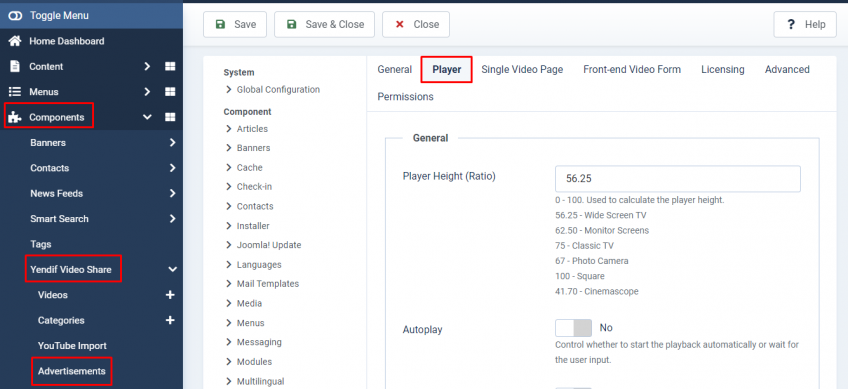
- Go to “Components → Yendif Video Share → Advertisements“
- Click the “Options” button on the Top Right
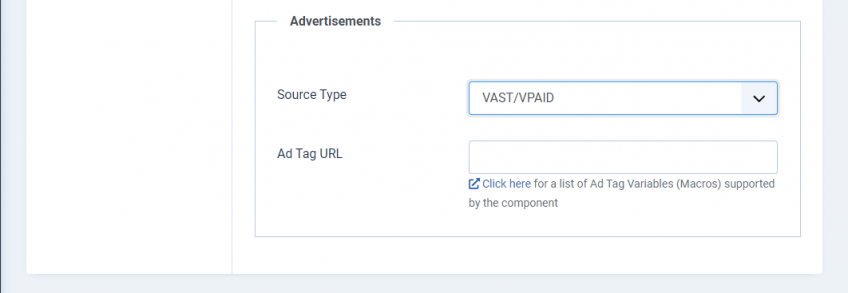
- Now click “Player” Settings and scroll down to the “Advertisements” section.
- Here you can find the options related to VAST/VPAID Ads.
What is VAST/VPAID?
VAST: Vast ( “Video Ad Serving Template” ) is used to serve ads for the video player. It is done with XML, contains information about types of video ads, where the ad video file is available, and when it should play.
VPAID: VPAID (Video Player-Ad Interface Definition) allows a video ad and a video player to interact with each other. It is done with Javascript code and it is increased the transparency into every video which will reduce some issues like mis-declared player sizes.
Why VAST/VPAID:
To play ads for the video, VAST/VPAID is one of the methods to allow the advertisements for the videos.
Types of video ads:
Linear ads: Display ads before the main video starts (pre-roll), Display ads after the main video ends (post-roll), or Display ads during a break in video content (mid-roll).
Non-linear ads: Display ads during video content playback, without disrupting playback.
Companion ads: Display ads on the page around the video player.
To Create a VAST/VPAID URL:
https://support.google.com/adsense/answer/1705823
Also, check the available Ad Tag Variables
Note: Even though the preroll and postroll is set as none for a video, if VAST/VPAID url is added in global configuration, the VAST/VPAID url will be played in the all videos.
Still stuck on something? We’re just an email away. Reach out to us here, and you should receive a reply within 24 hours, except on Sundays.