Find your symptom below. Each entry says what is causing it and what to do. If you are not sure where to start, work through the three checks first — between them they explain most problems people report.
Start with these three checks
1. Is everything actually installed and enabled?
Go to System → Manage → Extensions and search for yendif. You should see ten items — the component, six modules and three plugins — and all of them enabled.
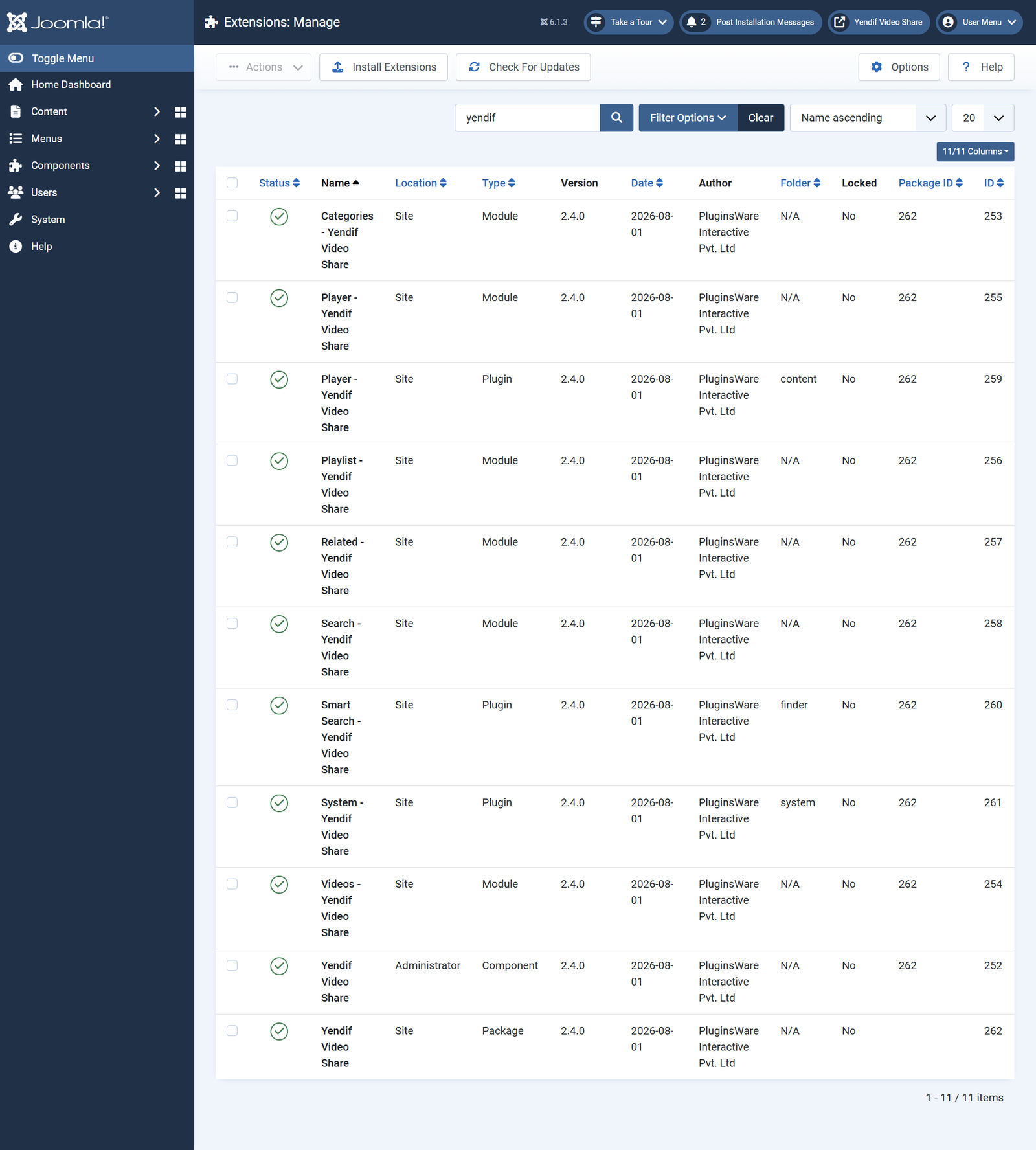
The three plugins each own a feature, so a disabled one looks like a broken feature.
- Player – Yendif Video Share — if disabled,
{yendifplayer}tags print as plain text in your articles. - Smart Search – Yendif Video Share — if disabled, videos never appear in your site’s main search.
- System – Yendif Video Share — if disabled, scheduled YouTube imports never run.
2. Are you testing as a visitor?
Open your site in a private or incognito window. As a Super User you can see restricted videos, unpublished content and every access level, so a page that works for you may be closed to everyone else.
This one check explains a large share of “it works for me but not for my visitors” reports.
3. Is a menu item overriding your setting?
Settings exist at three levels, and the narrower one wins.
- Global — set in Options. Beats nothing; it is the base.
- Menu item — set on the Yendif Video Share tab of a menu item. Beats Global, on that page.
- Module or article tag — set in the module’s settings, or as parameters on a
{yendifplayer}tag. Beats Global, in that placement.
So if a change in Options had no effect on one page, open that page’s menu item and set the field back to Use Global.
Nothing appears on my site
- The gallery page is empty. There are no published videos, or their category is unpublished. Check that both the video and its category show a green tick — an unpublished parent category hides everything beneath it.
- “No items found.” The category has no published videos, or Featured Only is on and nothing is marked featured. Publish videos in that category, or set Featured Only to No.
- My videos are nowhere on the front end. No menu item points at the component. Create one — see Set up your first video gallery.
- A module shows nothing. No position was chosen, the module is unpublished, or it is assigned to different pages. Check Position, Status and the Menu Assignment tab.
- A module appears on every page. Menu Assignment is On all pages. Switch to Only on the pages selected.
- Restricted videos appear to everyone. Access levels protect playback, not listings. This is working as designed — see Restrict videos to registered members.
- Videos appear from a category I did not choose. An empty Select Category means “everything”. Name the categories you want on that module.
The video will not play
Test the source first. Paste the video or stream URL straight into your browser’s address bar. If it does not work there, no player setting will help — the problem is the file or the stream.
- The player is blank. A wrong URL, or an
http://source on anhttps://site, which browsers block silently. Check the URL, and always use HTTPS sources. - “Sorry you do not have permission to view this content.” The video’s Access level excludes this visitor. This is intended — see Restrict videos to registered members.
- “This stream is currently not live.” An HLS or DASH stream that is off air, or a wrong URL. Confirm your encoder is broadcasting.
- Plays in Safari or on iPhone, but not in Chrome or Firefox. The stream is served without CORS headers. Apple browsers play HLS natively; others need permission from your streaming server. Ask your provider to enable CORS for your domain — see Publish a live stream.
- Autoplay does nothing. Browsers block autoplay when there is sound. Set the volume to 0 as well.
- Playback stops and starts constantly. There is not enough bandwidth for the quality served. Offer several quality levels, or compress the file.
- Sound but no picture, or the wrong codec. The file is not one browsers can play. Re-encode as standard H.264 MP4.
- An Iframe Embed Code video ignores my player settings. Playback is handled entirely by the other service’s player. This is expected — set width and height to 100% in the pasted code.
Thumbnails and images
- Grey placeholders everywhere. Those videos have no image, and no default is set. Set a Default Image under Options → General → Gallery.
- YouTube or Vimeo thumbnails were not fetched. Your server could not reach them when the video was saved — cURL missing, or outbound connections blocked. Ask your host to enable cURL or
allow_url_fopen, then re-save the video. - No thumbnail on a private Vimeo video. Private videos are not readable without authentication. Add your Vimeo Access Token under Options → Advanced → API Keys and re-save the video. If the thumbnail still does not appear, add an Image to the video by hand and let support know.
- No thumbnail on a self hosted video or stream. There is nothing to fetch a picture from. Add an Image yourself — streams especially need one.
- Thumbnails are stretched or letterboxed. Image Height (Ratio) does not match your images. Use 56.25 for widescreen, 100 for square, 150 for vertical video.
- Thumbnails are squashed or overlapping. There are too many columns for the space. Reduce Number of Columns — use 1 in a sidebar.
Layout and styling
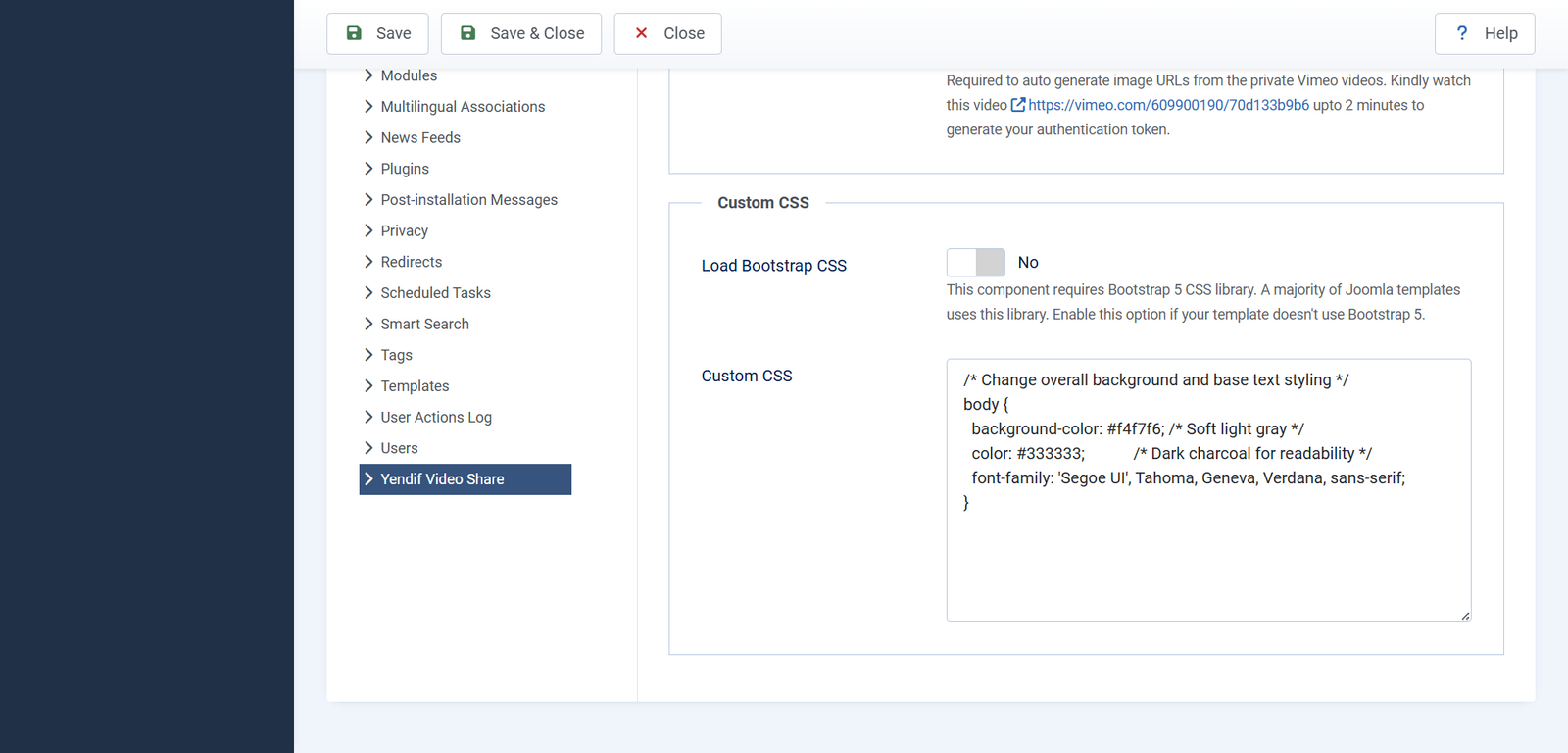
- The gallery is a plain unstyled list. Your template does not load Bootstrap 5 CSS. Set Load Bootstrap CSS to Yes under Options → Advanced → Custom CSS, but only if you need it.
- Everything looked fine, and now it is broken. You enabled Load Bootstrap CSS on a template that already had Bootstrap, so it is loaded twice. Set it back to No.
- Custom CSS has no effect. Your template’s CSS is more specific. Use a more specific selector, such as
.yendif-video-share .yendif-video-share-title. - Custom CSS will not restyle the control bar. The player runs in its own frame, which CSS cannot reach into. Use the player control settings instead — see Set up the player how you want it.
- Hiding a control changed nothing. Controlbar is hidden, so the whole bar is already gone. Set Controlbar to Show, then hide individual controls.
- The player is small on wide screens. Player Width is set. Clear it so the player fills its container.
- A dropdown shows a long capitalised code instead of a label. A translation string is missing for that option. It is harmless — the option still works, and it will be corrected in a future release.
Uploads
- The upload fails or times out. Your server’s PHP limits are too low. Raise
upload_max_filesize,post_max_sizeandmax_execution_time, or upload by FTP and paste the URL instead. - “File size should not be greater than…” This is Max Upload Size on the front-end form. Note it is in bytes — 50 MB is
52428800. Raise it, or clear it to use your server limits. - “This filetype is not allowed” on a valid video. Uploads are checked against a list of accepted types and the file’s real contents are inspected. Re-encode as standard H.264 MP4, or link the file by URL.
- “Error moving file” The uploads folder is not writable. Check permissions on
media/com_yendifvideoshare/uploads/. - Members cannot upload. Enable File Uploads is off, or their group lacks Create. See Let your members upload their own videos.
- Deleting a video did not delete its file. Only files uploaded through the form are deleted; files added by URL are left alone. This is intended, so shared files are never removed by accident.
A feature is missing entirely
If a settings panel shows This is a premium feature, or a screen shows an upgrade message instead of a form, the license key is not active.
These are the features that need a key:
- Embed, Share and Download buttons
- Open Videos in Popup
- Star ratings
- Likes and dislikes
- Advertisements, both VAST and your own clips
- YouTube bulk import
- Premium messages even though you have paid. The key was not accepted. Re-enter it under Options → Licensing and save, checking for stray spaces at either end.
- The setting is set to Show but nothing appears. Premium features are forced off without a key, whatever the setting says. Add the key.
- Not sure whether your key is working? Look at the bottom left corner of any player on your site. An orange Powered by Yendif badge means the key is not being accepted; no badge means it is.
- The player badge is gone but an admin screen still shows an upgrade message. The two are unlocked separately — the badge by your key, the admin screens by the package you installed. Add your license key explains both.
- It worked, and now it does not. Your key is issued for one domain. If the site moved, or is being reached on a different address, the key stops matching. See Add your license key.
YouTube import
- “YouTube API Key Invalid or Missing.” There is no key, the key is mistyped, or the YouTube Data API v3 is not enabled on your Google project. Check Options → Advanced → API Keys and the Google Cloud Console.
- “Import source not found.” The URL is wrong, or the playlist or channel is private. Open the URL while logged out of YouTube — if you cannot see it, nor can the importer.
- Scheduled imports never run. There is no cron job; imports are triggered by front-end page loads. Point a cron job or uptime monitor at any public page on your site. Working in the admin does not count.
- Nothing imports and no error shows. Can Import Videos? is set to No. Set it to Yes.
- A run stops part way. The batch is hitting your PHP time limit. Lower Batch Limit to 25.
- All imported videos share one date. Video Date is set to the import date. Change it to the original YouTube date. Videos already imported keep the old date.
- It worked for months, then stopped. Your daily YouTube API quota is exhausted. Check the quota in Google Cloud Console — a longer schedule and smaller batches use less.
- A deleted video came back. It should not: deleting an imported video adds it to that import’s exclude list automatically. If it does return, add its URL to Exclude URLs by hand.
Advertising, search, tags and votes
- No advertisements play. Advertisement Type is None, or no published advert matches the slot. Check both — see Earn money from your videos.
- A video shows an ad even though I chose “— None —”. — None — is treated as “not set”, so a random advert is still chosen. There is no per-video off switch; turn ads off globally if some videos must stay clear.
- No ads on YouTube or Vimeo videos. Those services control their own playback and advertising. Host videos yourself for advertising.
- Square brackets arrive at your ad server unchanged. That macro name is not recognised, so it was passed through as plain text. Note that
[video_id],[video_title]and[video_excerpt]are not valid — use[post_id],[post_title]and[post_excerpt]. See Ad tag variables (macros). - Macros in the Ad Tag URL are ignored entirely. Source Type is set to Custom Ads, which builds its own ad tag and discards what you typed. Switch to VAST/VPAID.
{yendifplayer}prints as text. The content plugin is disabled, or your editor mangled the tag. Enable the plugin, then retype the tag with the editor toggled off.- A tag ignores some parameters. A space crept in, around an
=or inside a value. Remove every space except those separating parameters. - A tag produced a playlist instead of one video. The tag contains
catid. Usevideoidinstead. - Videos are missing from site search. Joomla’s own Content – Smart Search plugin is disabled, or the index was never built. Enable both plugins, then run Components → Smart Search → Index.
- Only new videos appear in site search. Older ones were never indexed. Run the index once.
- Stars or like buttons do nothing. Guest voting is off and the visitor is not logged in. Log in, or allow guests under Options → General → Ratings.
- Someone voted twice. Guest votes are tied to a browser session. Turn guest voting off if counts must be reliable.
Problems in the admin
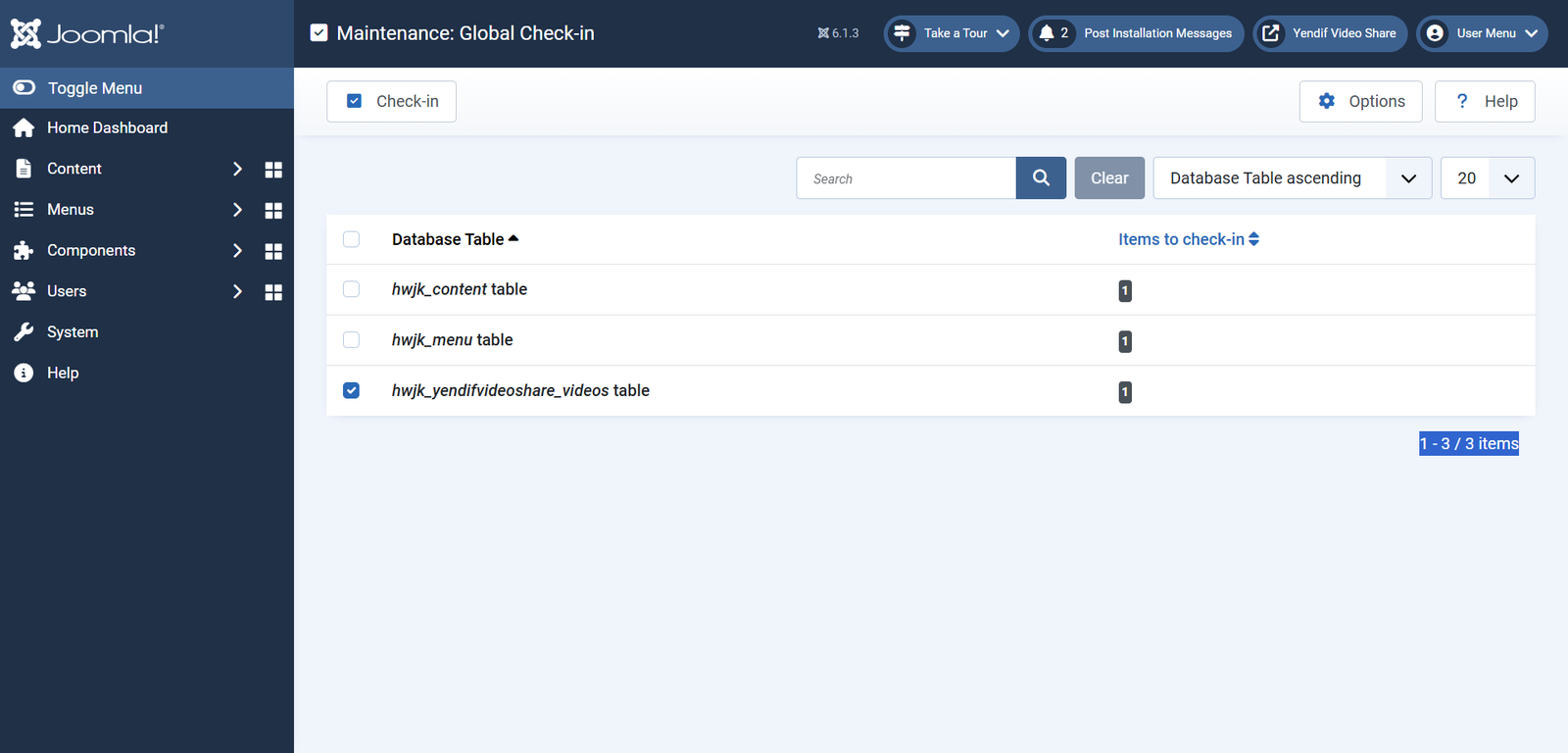
- A video shows a padlock and cannot be edited. Somebody opened it and never saved or cancelled, so it is checked out. Use System → Global Check-in.
- You cannot save a video. A required field is empty, usually Select Category. Every video needs a category, so create one first if you have none.
- Two videos ended up with the same alias. They cannot — aliases are made unique automatically, with a number appended. Set aliases deliberately if the URL matters.
- A dropdown of adverts or videos is empty. There is nothing published to choose from. Create and publish the item first.
- Publish dates are ignored. Schedule Video Publishing is off. Turn it on under Options → General.
- You cannot uninstall a single module. The package protects its parts. Uninstall the package instead, but note that this drops all seven database tables and deletes your videos — back up first.
After an update
- Odd errors after updating. Files were copied by FTP, so database changes never ran. Always update by installing the package through Joomla.
- Your layout customisations disappeared. The component’s own files were edited directly and have been overwritten. Use template overrides instead — see Change how your gallery looks.
- An override no longer matches the rest of the site. Overrides are frozen at the version you copied. Recreate the override from the current layout and reapply your edits.
- No update is offered. Joomla caches update information. Go to System → Update → Extensions, then Find Updates.
Still stuck? Here is what to send us
We can help much faster with a few details up front. Include as many of these as you can.
- Your Joomla version and PHP version — both are on your admin home page.
- Your Yendif Video Share version, from System → Manage → Extensions.
- Which template you are using.
- A link to the page where the problem happens, so we can look at it.
- The Source Type of the video involved — YouTube, self hosted, HLS and so on.
- What you expected, and what happened instead.
- A screenshot, if there is anything to see.
- Whether it happens in a private browser window too.
If you can, try it once with your template switched to a default Joomla template. If the problem disappears, it is a template conflict and knowing that saves everybody a lot of time.
Get in touch with our support team.
All the guides
- Set up your first video gallery
- Put videos on your homepage and sidebar
- Add a video to any article or page
- Build a player with a playlist
- Move your YouTube channel onto your site
- Publish a live stream
- Earn money from your videos
- Restrict videos to registered members
- Get visitors rating and discussing your videos
- Get your videos found in search
- Change how your gallery looks
- Set up the player how you want it
- Ask permission before loading YouTube and Vimeo
- Let your members upload their own videos
- Settings reference